
Self Publishing Expert Carla King will be the speaker at the February BAIPA meeting on Saturday, February 6.
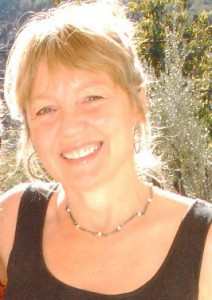
Her topic will be:
Beyond the Usual Suspects: New Publishing Options for Fun & Profit
Carla blogs regularly on a number of topics, and she has written one on metadata which you can read below:
Metadata: An Author’s Most Effective Marketing Partner
Carla King, AuthorFriendly.com
Metadata might seem like an overwhelming topic but metadata and keywords are really just words about words, a summary of who you are and what you write about. This makes metadata your most effective passive marketing partner, and it’s free! Metadata is used by search engines to automate a formerly labor-intensive task by connecting readers, curators, and distributors to books more efficiently than ever before. The self-publisher who understands metadata, levels the playing field to compete alongside big publishing—but only if you use it.
Search engines consider all the words on your website as metadata, but you can help them become more accurate by providing a summary of your most important words, using them over and over again on your website, social media and book registration pages (such as the description of your book in its Bowker ISBN record).
Here’s how metadata looks to search engines. You will never see this geeky code unless you use the DEVELOPER or VIEW > SOURCE tool in your browser toolbar (Chrome, Safari, Firefox, IE).
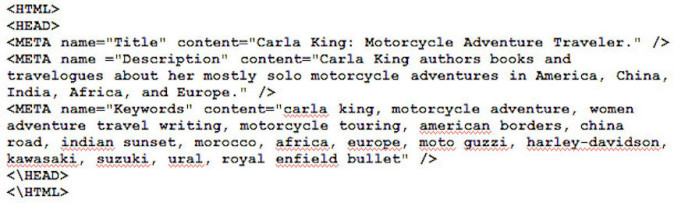
Metadata lives between the HEAD tags of the HTML in the source code of web pages.
Metadata in WordPress
Behind the scenes in your WordPress blog, it’s easy to insert metadata with category and tag fields that describe each of your web pages and each blog post, as I have in my dual-sport motorcycle boot review below.
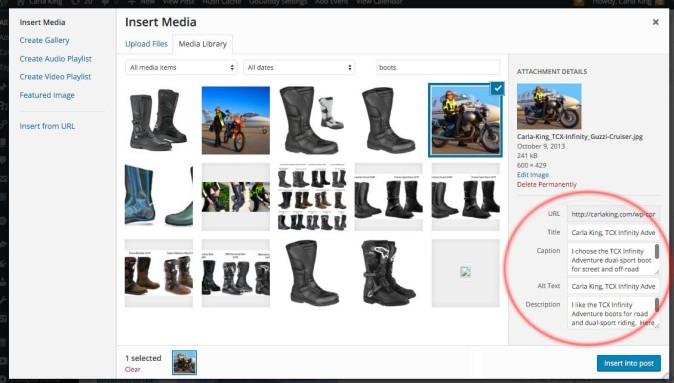
Don’t forget to tag each of your images with metadata, entering relevant keywords in their Title, Caption, Alt Text and Description fields. Note that your name is a keyword, as are brand names and words like “review” (in case someone’s looking for a product or book review or even a geographic location).
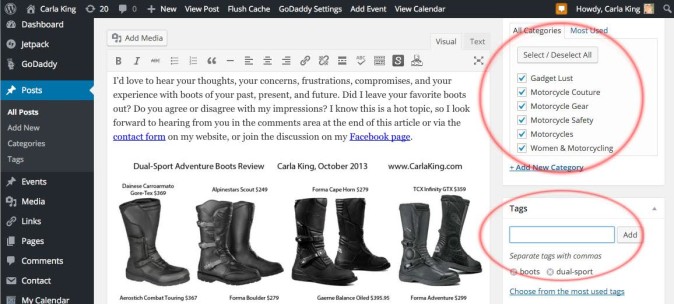
It’s important to use images in every blog post and web page, because web extensions allow people to automatically share these images in their visual social media tools like Pinterest. When they share, their followers who click on the image are directed to your website. So make sure you have an email newsletter signup widget on each page.
The first few sentences of each of your web pages and blog posts should be keyword-rich, too, because search engines determine relevancy by comparing the keywords you’ve inserted in the page’s or post’s fields with the actual content found in the first paragraph.
My dual-sport boots review was picked up by lots of motorcycling, overlanding and adventure travel websites and it got huge traffic. Each visitor was popped over to my website and was given the opportunity to sign up for my email newsletter. Google Analytics showed me that many of these visitors went to my books page, too. Now that’s marketing!
How to Create Your Keywords
Here’s a keywords list creation exercise that will help you identify the terms people will use to find you and your books. In some of my workshops I put authors (who don’t know each other) in groups of three for this exercise.
- Start by creating a worksheet to help you narrow down your keywords. I’ve found that most people work better by jotting ideas down on paper rather than on the computer. Get messy and cast a wide net. Then start narrowing them down. If you’re working in a group, this is the time to interview each other to find out what words people who don’t know you would use.
- Use Google Adwords Keyword Planner to help you find effective keywords. (Detailed instructions on how to use it are provided on their website.)
- Record words and short phrases you think your readers might use to enter into a search engine to find you and your book.
- Eliminate the less important and more generic words and phrases from your list.
- As described at the top of this blog post, take a look at the metadata in the source code of web pages of authors with competing books to see what terms they’re using. In most browsers, you can see it using the DEVELOPER or VIEW > SOURCE in the toolbar.
Your end goal is to create a final list of no more than 10 to 20 words with a 900-character maximum. Try to keep the number of repeated keywords to a maximum of three. Use your final keywords list for your book metadata, for creating tags on blog posts and in your social media properties.
Create a metadata document on your computer with your keyword-rich bio and book descriptions, to refer to again and again.
Enjoy some more of Carla’s blog posts:
MediaShift 7 Developments in Self Publishing in 2015 that Help Writers Focus on Writing
BookWorks Practical Editing Tools for Indie Authors
BookWorks Great Free Editing Tools for Indie Authors
BookBaby Creating Your Author Brand
Author


One of my favorite things about BAIPA is its culture of generosity, the willingness — even eagerness — to share what we have each learned in the process of bringing stories to life. We provide educational programs, networking, marketing opportunities, encouragement, and information on industry vendors and services. And lots of one-on-one advice and mentoring.
We welcome all who have an interest in making connections within the world of independent publishing and learning more about how to publish and sell their work successfully. Together we are raising the standard of independent publishing and helping our members thrive.
Do join us!
—Becky Parker Geist, BAIPA Board of Directors, President
Quick Resources
Current BAIPA members do not need to register for our monthly meetings. The night before the meetings, they will receive the Zoom info. For workshop registration, currently, members get in free for all workshops and will receive the Zoom info the night before the meetings, as well as in the confirmation email.